This codelab is part of the 2026 Agentic Architect Sprint by Google.
Agentic workflows spend a surprising amount of time waiting. The classic example is npm install: a long, network-bound operation that historically froze the agent — it sat idle, unable to write a line of application code, until the install finished. This codelab teaches the Antigravity 2.0 answer to that waste: asynchronous background tasks, where the agent offloads long-running work to a background process and keeps making progress, then streams the results back when they finish.
The starting point
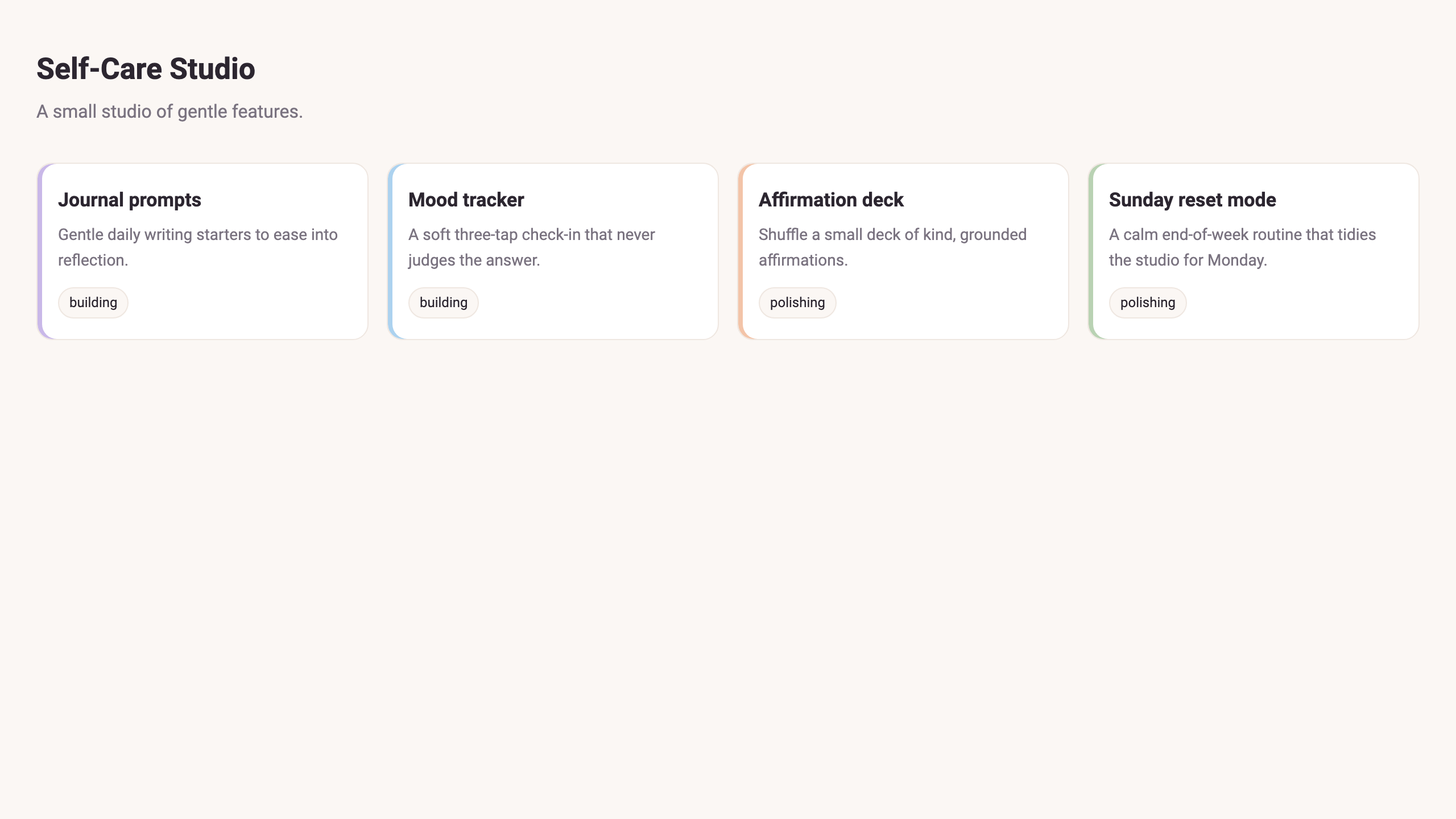
The Self-Care Studio is a tiny static web app — a calm little studio of four features: journal prompts, mood tracker, affirmation deck, and Sunday reset mode. The starter renders those four cards from a local data/features.json, but the build isn't finished:
- each feature still needs its own ES module under
src/features/; - the project depends on
puppeteerandvite, which are not installed yet; - there is a production build to run and a test suite to pass.
It serves today, but to ship it the agent has real work to do — and some of that work is slow.
The problem
Look at the dependencies. Installing them downloads a Chromium binary; on a cold cache that takes the better part of a minute. The test suite is deliberately slow, too. Run that work the naive way — one blocking step after another — and the agent stalls: it kicks off npm install, then waits, doing nothing useful, while there are four feature modules it could be writing right now. Multiply that across every slow build, install, and test cycle and most of the agent's wall clock is spent idle.
The real work is keeping the agent productive during that wait: pushing the slow, independent steps into the background so the main agent — and you — keep moving.
How Antigravity helps
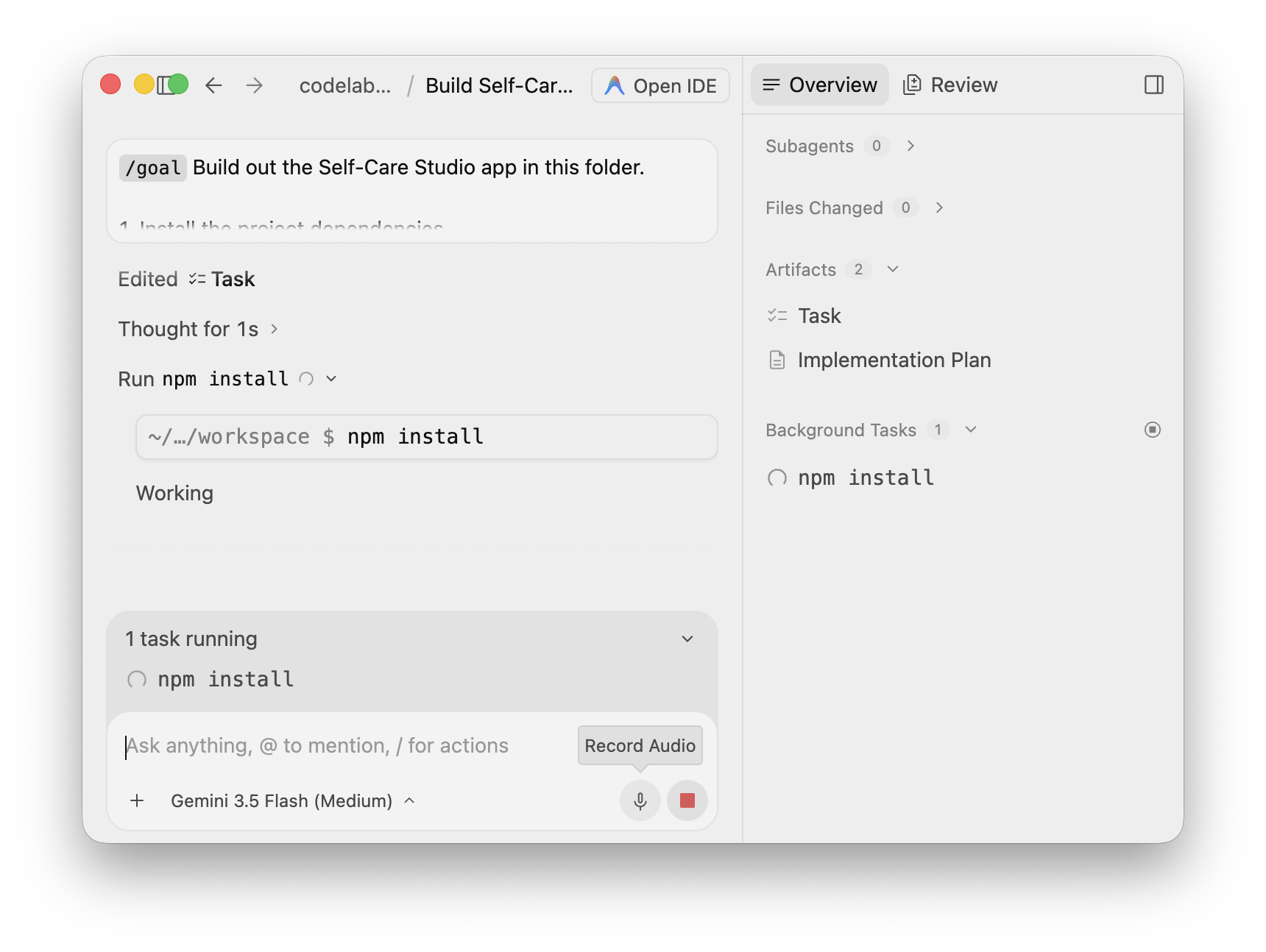
Antigravity 2.0 agents support asynchronous task management. A long-running operation is offloaded to a background process so it does not block the main agent's active loop or the UI. The agent invokes the work, immediately yields control, and the background task streams its output back into the agent's progress log. The agent can even poll a long task periodically and pick up the moment it finishes. You watch all of this on the Overview surface: a live Background Tasks list and an inline task running indicator.
You give one agent a single goal, and it offloads the slow install, writes all four feature modules while the install is still running, builds, and then runs the slow test suite as a background task it polls — never sitting idle.
What You Will Build
A finished Self-Care Studio, built by an agent that never blocked on its slow work:
- four
src/features/*.jsmodules, written whilenpm installran in the background; - the dependencies installed and a production bundle built under
dist/; - a passing test suite, run as a background task the agent polled instead of waiting on.
What You Will Learn
- How an Antigravity 2.0 agent offloads a slow operation to a background process and keeps working.
- How to read the Overview surface — Background Tasks, Files Changed, and Artifacts — to watch async work in real time.
- How the agent yields control immediately and streams a background task's output back into its log.
- How the agent polls a long-running task (with a timer) and resumes when it finishes, instead of blocking.
- How to verify the finished result with the built app and the test suite.
Cost and Scope
This lab uses one bounded goal. The only slow steps are a real npm install and a deliberately slow test suite — both run in the background by design. There is no duplicate blocking run to pay for. Stop once the app builds and the tests pass.
Target duration: 35–45 minutes.
Step 1: Install Antigravity 2.0
Download and install Antigravity 2.0 from:
Follow the current onboarding and sign-in flow shown by the application.
Step 2: Choose a Supported Sign-In Path
Choose the path available to you:
- Recommended quick path: Sign in normally with your Google Account through the app onboarding flow.
- Optional enterprise path: Use Antigravity through the Gemini Enterprise Agent Platform if your organization provides it.
If you use the enterprise path, ask your administrator to complete the documented setup:
- Create or select a Google Cloud project with billing enabled.
- Enable the Agent Platform API:
aiplatform.googleapis.com. - Grant administrators enabling services
roles/serviceusage.serviceUsageAdmin. - Grant Antigravity users
roles/aiplatform.user.
Official reference: Use Antigravity with Gemini Enterprise Agent Platform
Step 3: Confirm Prerequisites
This codelab requires Node.js 20+ to run the build and the test suite, and Python 3 to serve the finished app.
node --version
python3 --version
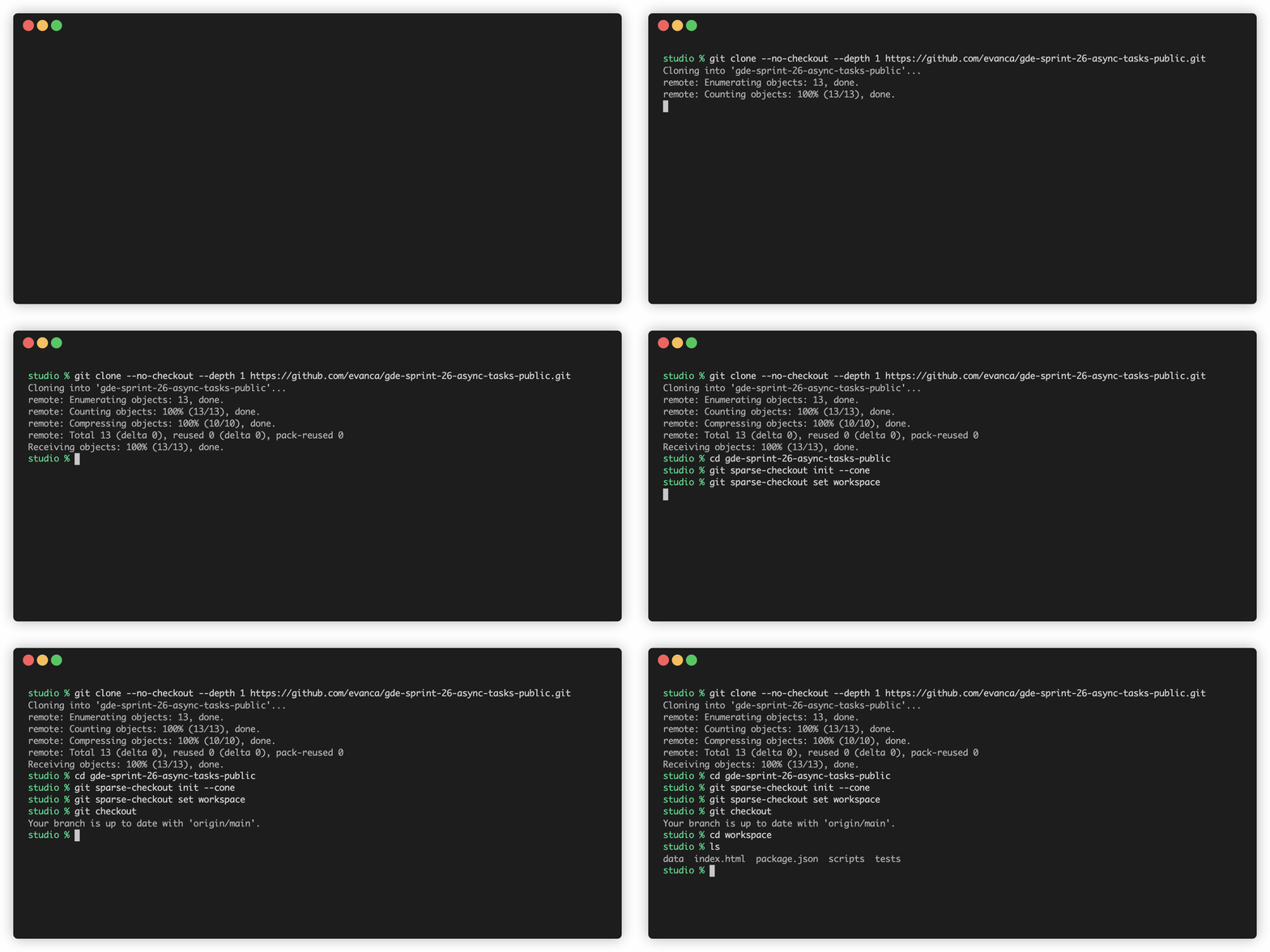
The app lives in workspace/. Pull down just that folder with a sparse checkout:
git clone --no-checkout --depth 1 https://github.com/evanca/gde-sprint-26-async-tasks-public.git
cd gde-sprint-26-async-tasks-public
git sparse-checkout init --cone
git sparse-checkout set workspace
git checkout
cd workspace
The starter is the unfinished Self-Care Studio:
workspace/
├── index.html              # renders four feature cards
├── data/features.json      # the feature data
├── package.json            # depends on puppeteer + vite — NOT installed yet
├── scripts/                # a11y / screenshot / docs task stand-ins
└── tests/slow.test.js      # node:test contract tests (deliberately slow)
Confirm the baseline tests pass before involving an agent. They need no dependencies — but notice how long they take:
node --test
The suite passes (four tests), and it takes roughly 40 seconds — on purpose. That wait is exactly the kind of slow, independent work you are about to watch the agent run in the background instead of blocking on.
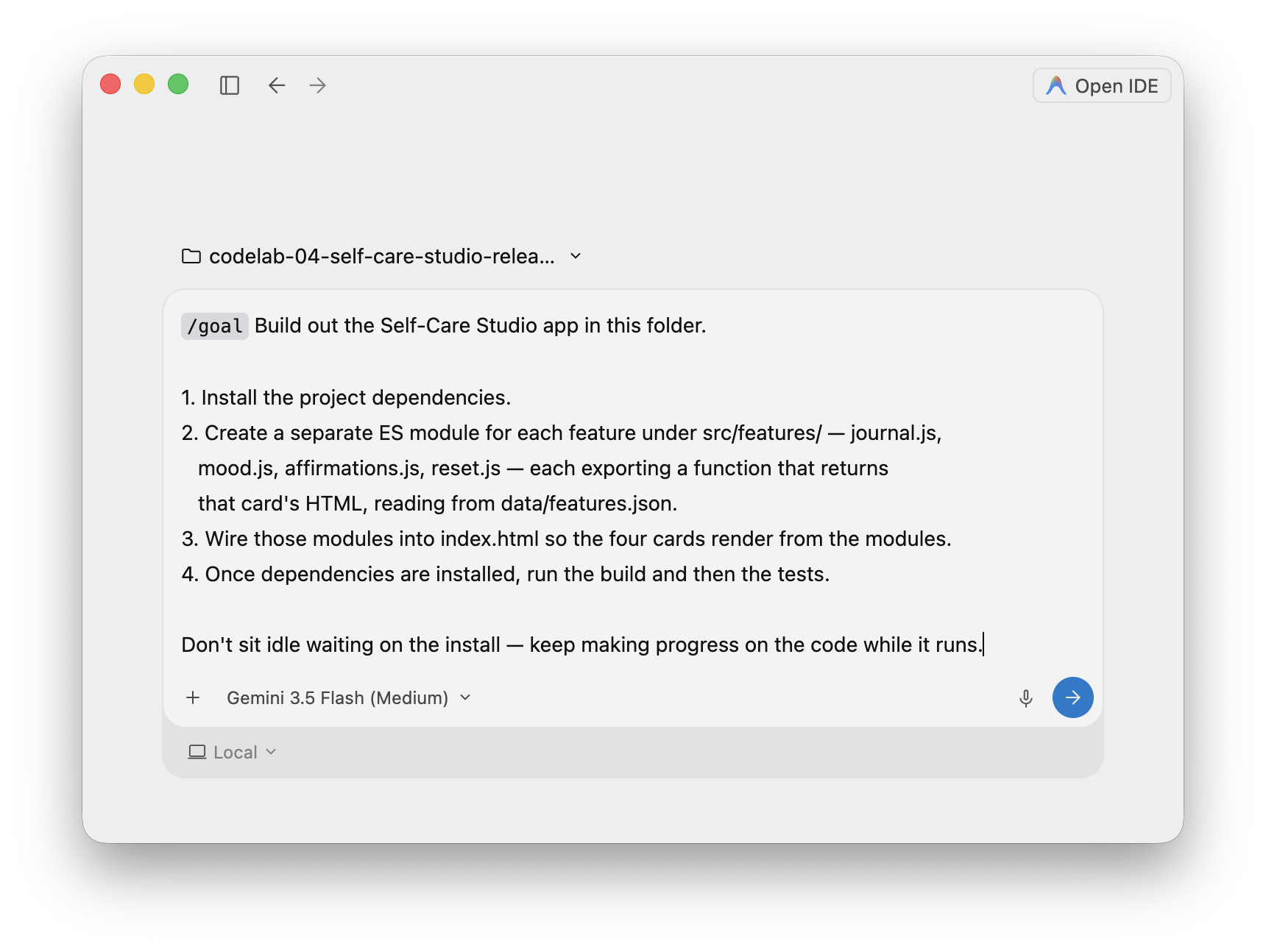
Open the workspace folder in Antigravity 2.0 and start an agent. Confirm the model and execution target shown by the app — this run used Gemini 3.5 Flash (Medium) with the Local target. The Open IDE control (top right) toggles to the editor surface; you can stay on the agent surface for this lab.
Give the agent a single goal that deliberately pairs a slow install with independent code to write. Paste it verbatim:
Build out the Self-Care Studio app in this folder.

1. Install the project dependencies.
2. Create a separate ES module for each feature under src/features/ — journal.js,
   mood.js, affirmations.js, reset.js — each exporting a function that returns
   that card's HTML, reading from data/features.json.
3. Wire those modules into index.html so the four cards render from the modules.
4. Once dependencies are installed, run the build and then the tests.

Don't sit idle waiting on the install — keep making progress on the code while it runs.
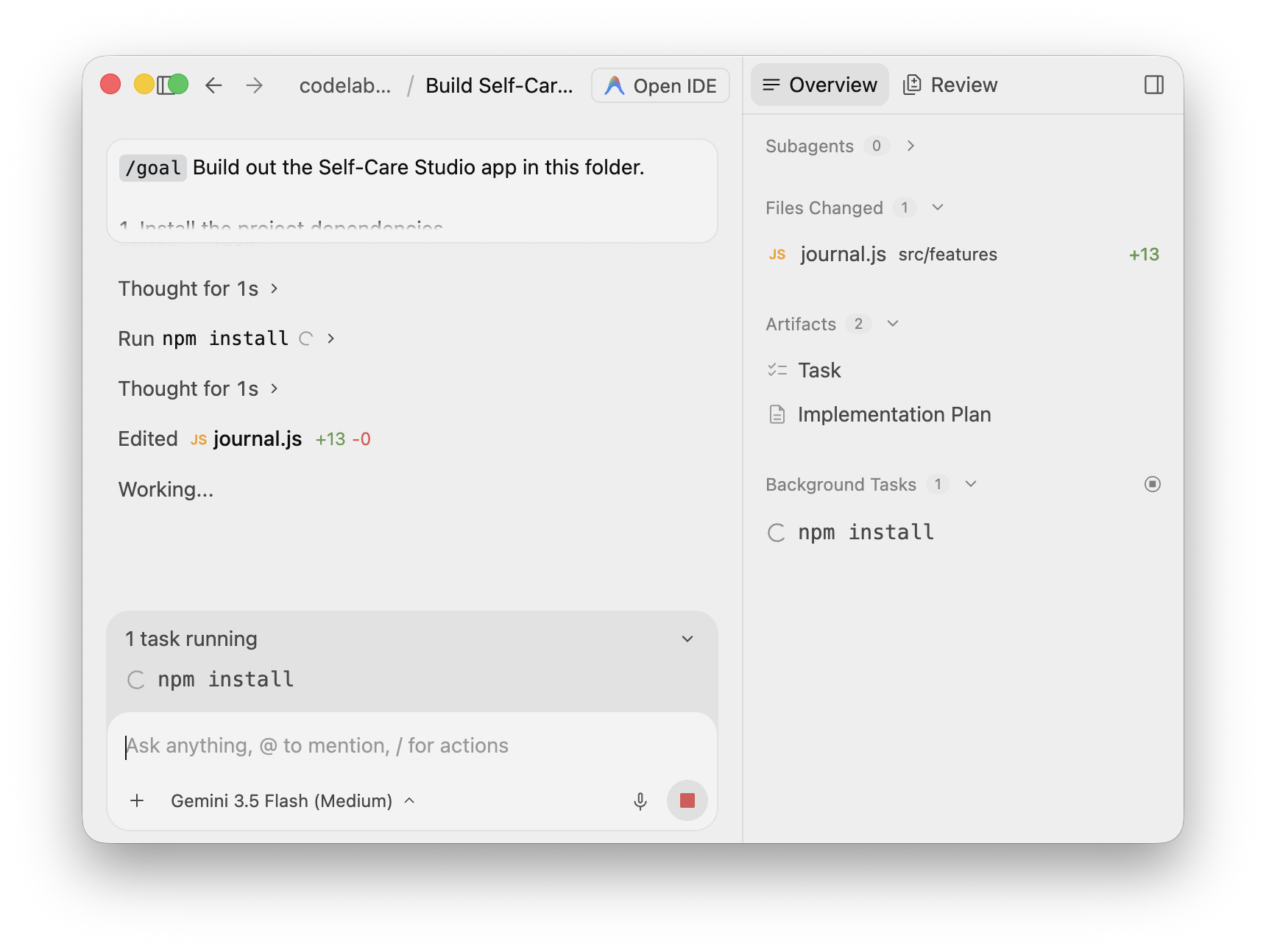
Submit it and watch the agent start the install. The key thing to notice: the agent runs npm install, then does not wait. The Overview panel on the right lists the install under Background Tasks, and an inline task running indicator appears above the prompt — while control returns to the agent immediately.
This is the payoff. The install is still running in the background — but the agent is already writing application code. It creates the first feature module while Background Tasks still shows npm install:
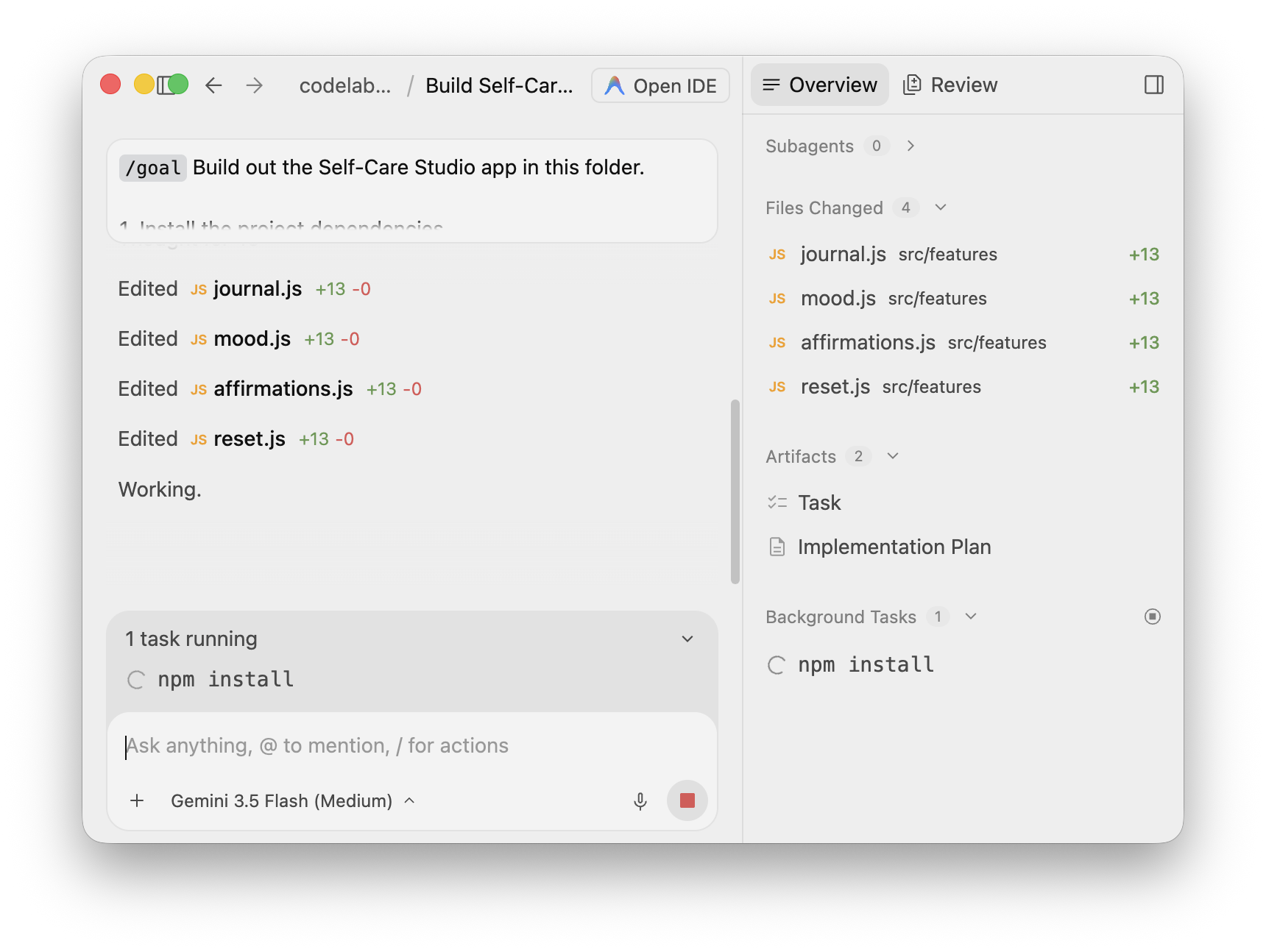
It keeps going and writes all four feature modules — journal.js, mood.js, affirmations.js, reset.js — before the install has even finished. The Files Changed count climbs to four while the install task is still live:
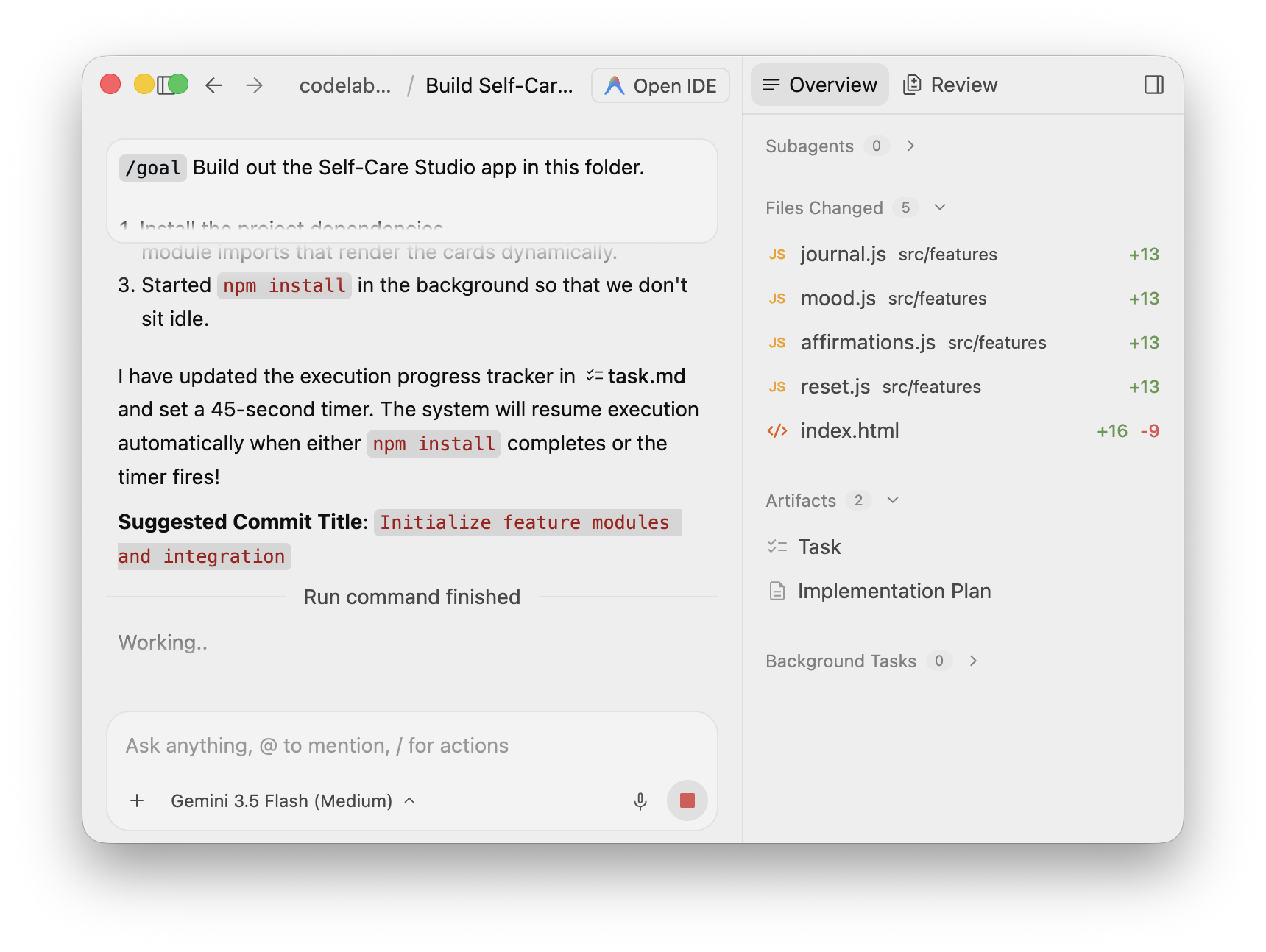
The agent says so in its own words: it started the install in the background "so that we don't sit idle," updated a task.md progress tracker, and set a timer so the run resumes automatically when the install finishes. Once it does, the Background Tasks list drains back to empty and the agent wires the modules into index.html:
Why This Matters
A blocking agent would have started npm install and then stopped — burning a minute of wall clock doing nothing — before writing the first module. Here the slow install and the code-writing overlap completely, so the agent keeps building for the whole minute the install takes.
With the dependencies in place, the agent builds the production bundle and then turns to the slow test suite. Instead of blocking on the ~40-second run, it launches npm test as a background task:
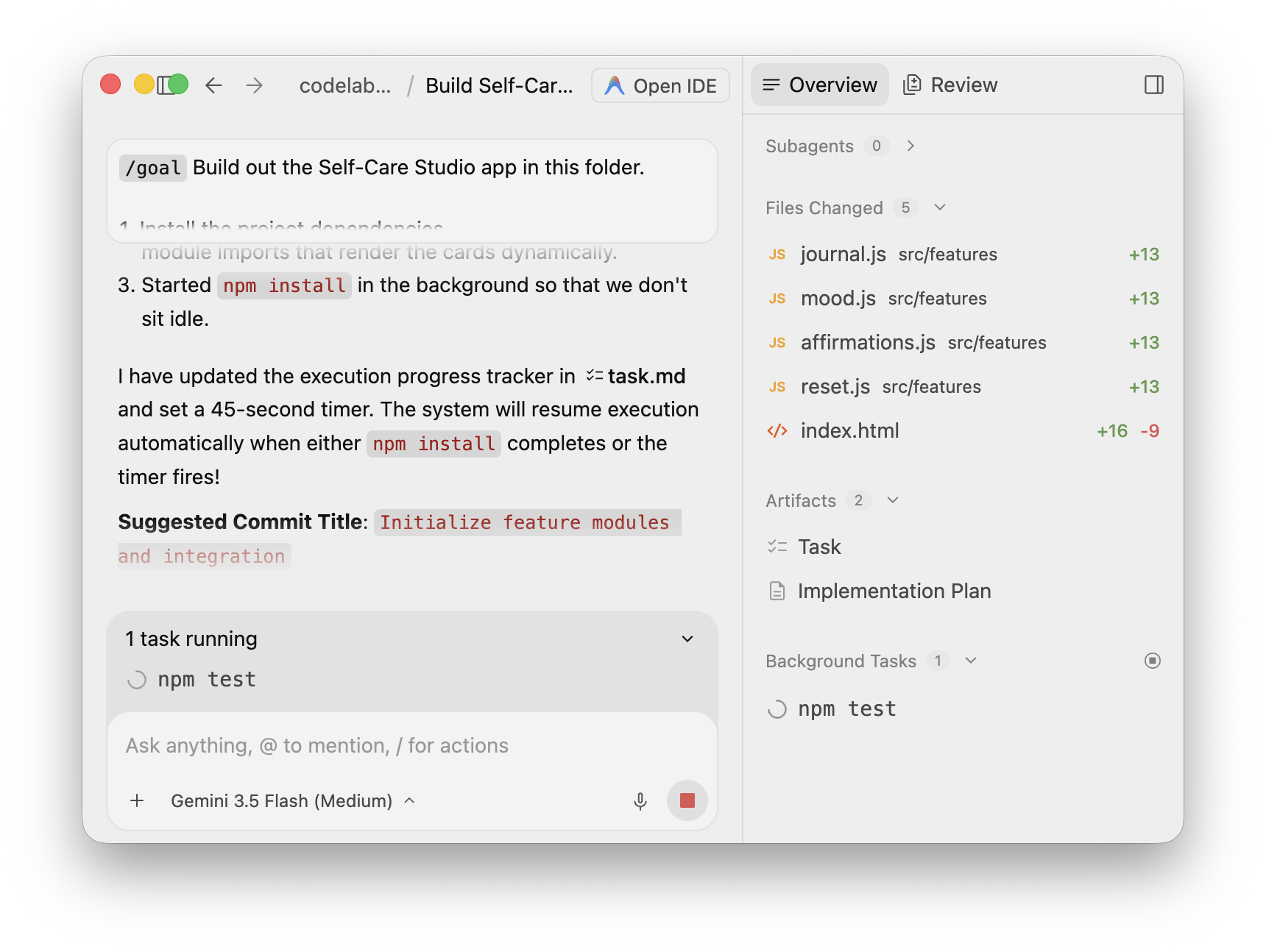
Then it does something neat: it adds a second background task — a short timer whose job is to check the test status — so it can poll the long run and pick up the moment it finishes. The Background Tasks list now shows two tasks running at once:
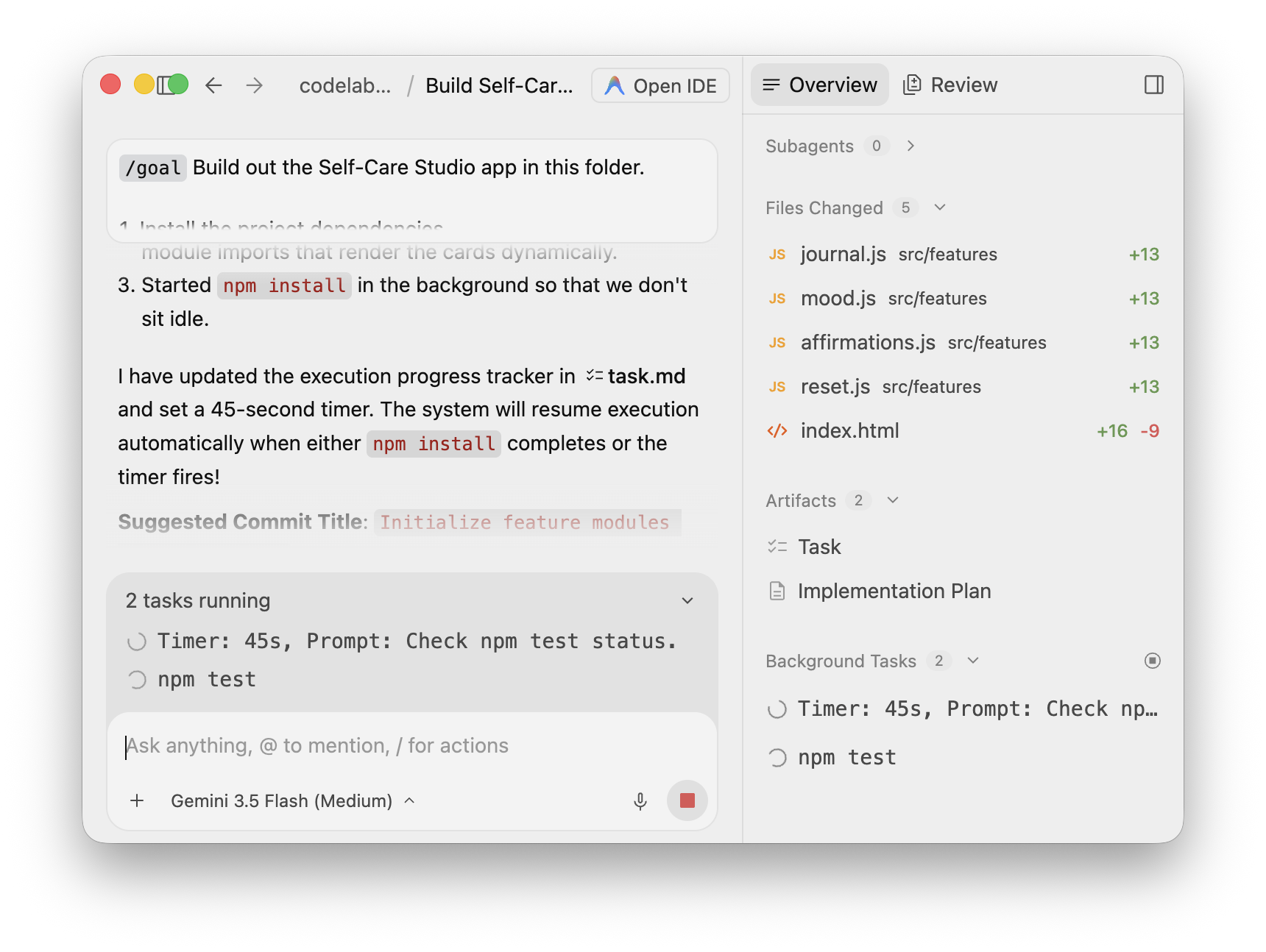
This is the asynchronous pattern end to end: invoke the long work, yield control, stream progress back, and poll until it concludes — never freezing the loop.
When the run finishes, the Background Tasks list is empty, Files Changed shows the four modules plus index.html, and the agent has produced its Walkthrough artifact summarizing the build:
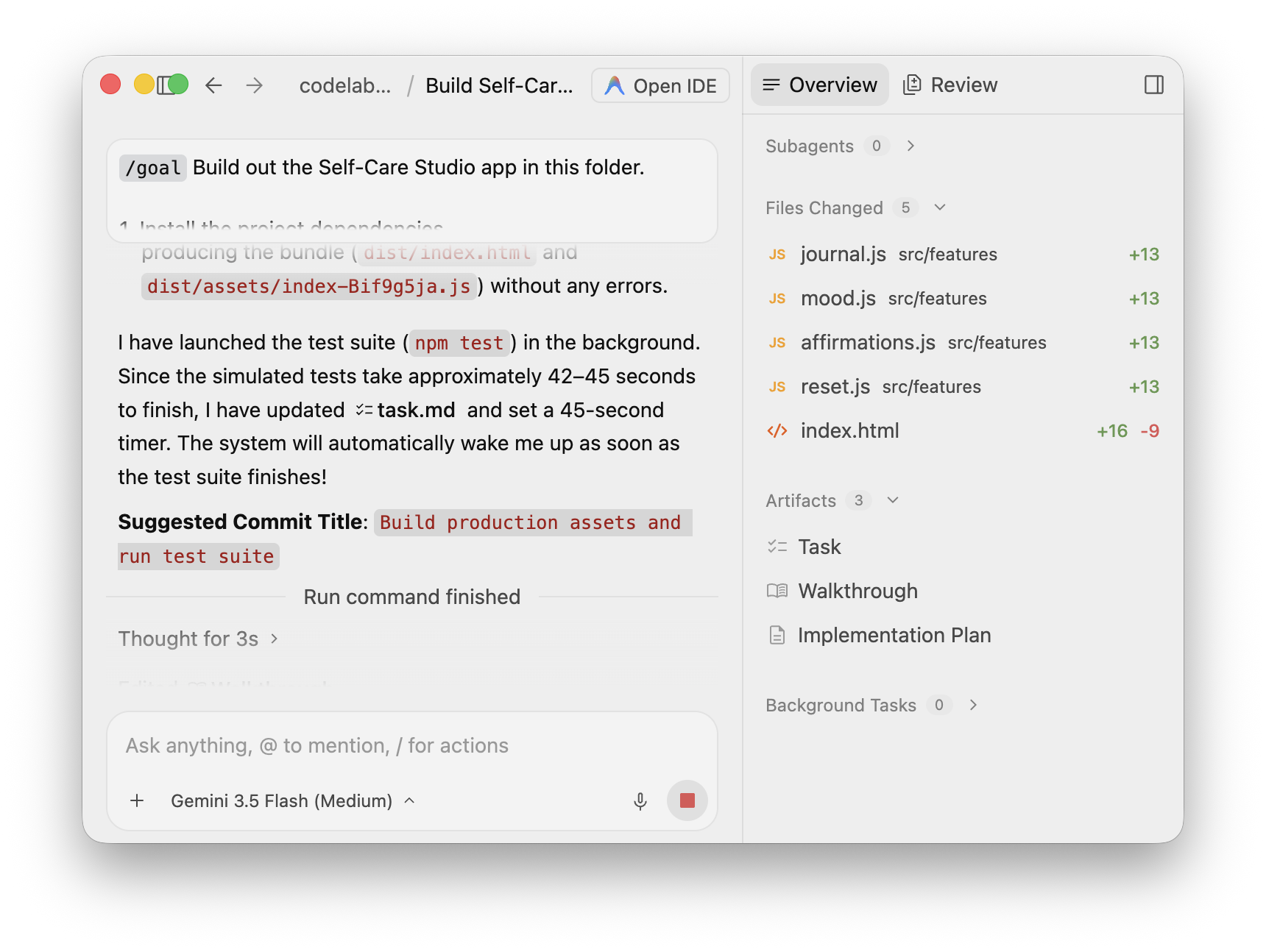
Confirm the work from your side. The test suite is green:
node --test
Serve the app and open it:
python3 -m http.server 8000
Open http://localhost:8000/ and verify:
- All four feature cards render — journal prompts, mood tracker, affirmation deck, and Sunday reset mode.
- Each card shows its title, summary, status, and accent color.
- The cards are produced by the new
src/features/*.jsmodules (not the old inline markup). - The browser console reports no errors.
If a check fails, send one narrow correction request to the agent, then re-run only the failed check.
You used Antigravity 2.0 asynchronous background tasks to finish a build without ever blocking: one agent offloaded a slow npm install to a background process, wrote all four feature modules while it ran, built the bundle, and then ran a slow test suite as a background task it polled with a timer instead of waiting on.
You learned:
- Long-running operations are offloaded to a background process so they don't block the main agent or the UI.
- The agent yields control immediately and streams a background task's output back into its progress log.
- The Overview surface — Background Tasks, Files Changed, Artifacts — makes asynchronous work observable in real time.
- An agent can poll a long task with a timer and resume the instant it finishes.
- Background work turns idle waits into useful progress, keeping the agent productive across every slow install, build, and test cycle.